
An Introduction To Email Deliverability & Sending Priority - From Name & Address
What is deliverability and why is it important?
Deliverability is a measure of how many of your emails are going to Subscribers' inboxes vs their spam folders. After putting so much work into your email marketing, you want to be sure that your messages are actually being seen by your Subscribers! This is why deliverability is crucial.
How is deliverability determined?
There are a lot of factors that influence inbox placement. In general, mailbox providers are trying to determine three things:
1. Is the message safe?
2. Is the message wanted by most Subscribers.
3. Is the message wanted by this particular Subscriber?
If the answer to all three questions is yes, the message belongs in the inbox. If any of the answers above are no, this message belongs in the spam folder. To make this decision, mailbox providers typically turn to the sender reputation they have calculated for you.
Sender Reputation
Mailbox providers, such as Gmail, Microsoft, Yahoo, etc., create a reputation score for your sending domain. You can think of this like a credit score, but unfortunately there’s no one source of truth that can indicate exactly what your score is and why. Mailbox providers keep your score, and the algorithms used to determine it, private. However, the most important determining factor is the way that Subscribers engage (or don’t engage) with your message.
Subscriber Engagement
The best way for mailbox providers to determine where your mail belongs is by seeing how your Subscribers interact with it. There are actions your Subscribers can take that will raise your sender reputation, and actions that will lower your sender reputation.
Here are some recommendations for promoting positive engagement:
List Health
. Only import Subscribers who have given you direct permission to receive email marketing. Quality is much more important than quantity when it comes to email marketing. You don’t want anyone on your list who doesn’t want to be there. For the best deliverability, be sure everyone on your list knew exactly what they were signing up for.
. Secure your Forms with a double opt-in and/or ReCaptcha. If your Form isn’t secure, there’s a good chance you’ll start to see bots abusing it. We talk more aboutwhy this is harmful to your deliverability here.
. Prune your list regularly. Be sure you don’t let Cold Subscribers pile up. If you don’t clean your list regularly, the unengaged Subscribers will start to become the majority. When this happens, your sender reputation drops and more messages start to be filtered to spam. Learn more abouthow to prune your list here.
Consistency
An important component to your sender reputation is consistency. If there is any sudden change to the way you send messages, mailbox providers will see your messages as risky and potentially place it in the spam folder. Here are some characteristics you’ll want to keep consistent:
. Sending Domain: It’s perfectly fine to send from multiple domains, but be sure the domain you’re sending from is the domain that Subscribers will recognize. Avoid sending from a brand new domain or a domain that has not sent any mail in a long time (over 6 months).
. Volume: Be sure to send to a consistent number of Subscribers each week. It’s normal for your list to shrink and grow, but try not to have any major volume swings. (You don’t want to go jump from 5,000 Subscribers to 20,000 Subscribers overnight!) If you need to introduce a large number of new Subscribers, be sure to start sending to them in small batches so you don’t alarm mailbox providers.
. Frequency: Send at least once per month to keep your sender reputation established. If mailbox providers don’t see enough mail from you, they won’t be able to maintain a reputation for you and you’ll be starting from scratch on your next send. Also, be sure not to send too frequently to Subscribers -- it could cause them to mark your messages as spam! We recommend asking your Subscribers ahead of time how often they’d like to hear from you andgive them the ability to modify their preferences in each email.
Content
While content matters much less than it used to when it comes to inbox placement, it still has the potential to influence your deliverability - especially if your sender reputation isn’t well established.
If mailbox providers haven’t seen consistency from you like we covered above, they might not have enough information to decide whether your message is safe and wanted. This means they might need to rely on your content as another data point to make this decision.
On the flip side, if mailbox providers have seen enough consistent volume from you that they have confidence in the way you’ve been scored, they’re more likely to totally ignore your content. Here are some things to keep in mind:
. Don't Use Link Shorteners: Because link shorteners are used so often by spammers, they can raise a red flag for spam filters. Transparency is key for good deliverability. When adding a link to your emails, link directly to the website you're sending subscribers to.
. Spammy words and phrases: The biggest mistake marketers make is using language that’s overly promotional and/or urgent. Even if you are selling something in your email, try to write your email so that it sounds human and conversational.
. Image-to-text ratio: There’s no magic number here, but the best guideline to follow is to have enough text in your email so that if images failed to load, you’d still have a great email that communicates your message.
. Avoid gimmicks: While you might see a quick boost in open rates from a subject line that says “Re: Your Order #2095642”, you’ll lose Subscribers’ trust. Your audience will be much more likely to mark the message as spam or become disengaged with your emails. Avoid quick tricks to boost engagement.
. Encourage authentic engagement: Give your Subscribers permission to engage with you in an authentic way. This engagement will help boost your sender reputation but also help build a relationship with your Subscribers. A fun example would be asking your Subscribers to reply to your message with their favorite song right now.
Summary
Influence mailbox providers to place your messages in the inbox by becoming Subscriber-focused. Give your Subscribers the power to choose the type of content they want to receive and how often they want to receive it. Build a list of Subscribers who want to be there, and create the kind of content that keeps them engaged!
Which sender email should the leads be getting the emails from?
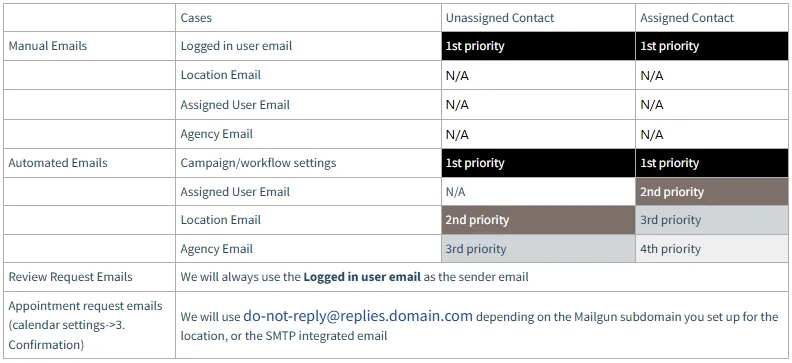
If you are using Mailgun/LC Email, we will use the Business email here if the lead is not assigned:

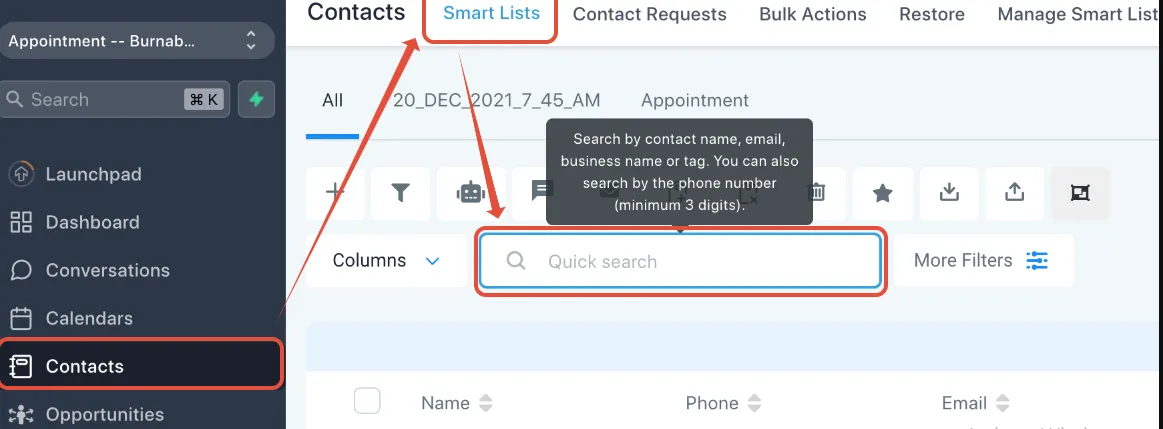
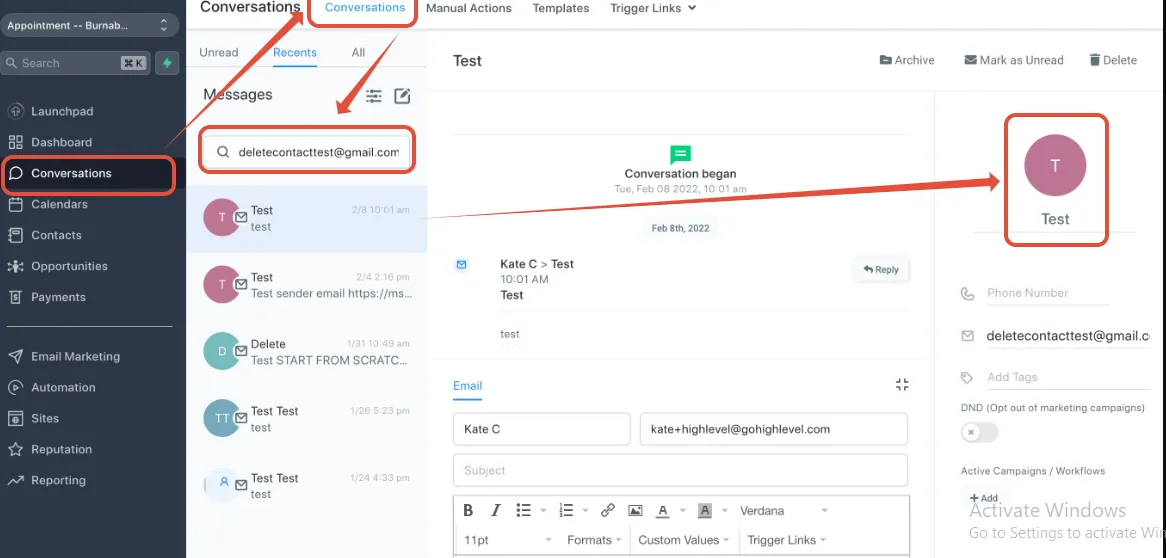
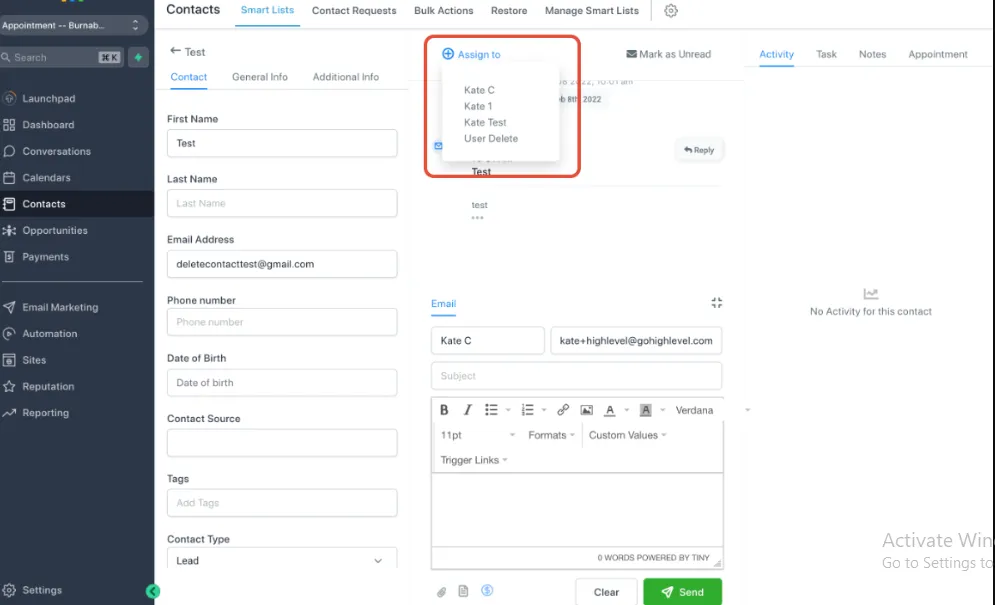
How to check if the contacts are assigned or unassigned
Search for the contact in the Smart Lists tab
Search Conversations -> Click on the icon on the right to view the Contact Details
Check who is assigned to the contact here:
Places you can configure the sender's email - Manual email.
Conversation tab
The From email will be the user logged in email by default:
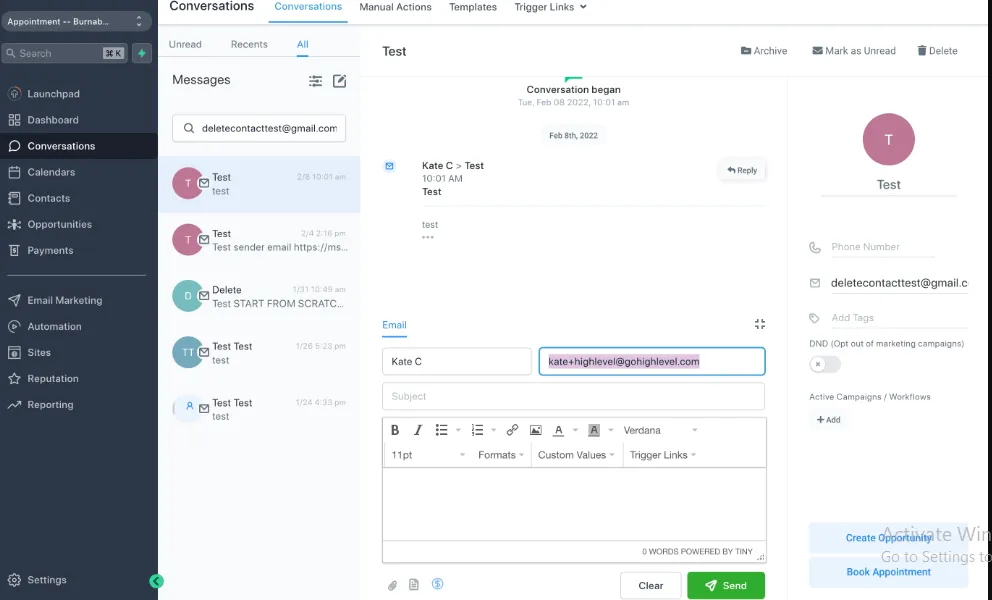
However, if you have 2-way email sync set up, the email will show the integrated email:
. How to Set Up Two Way Email Sync for Gmail
. Two Way Email Sync for Outlook
Places you can configure the sender's email - Automated email Email template
Click on Marketing >Emails>
Templates >+New

Frequently Asked Questions
1. What tools can I use to monitor my email deliverability?Various tools can help track email deliverability, including platforms like Mailgun, SendGrid, and Litmus. These tools provide insights into bounce rates, open rates, and sender reputation, allowing you to optimize your email campaigns.
2. How can I recover from being blacklisted by email providers?If you find your domain or IP address blacklisted, start by identifying the cause, such as spam complaints or poor sending practices. Rectify any issues, ensure compliance with best practices, and then follow the specific removal process for the blacklist. Building a positive sending reputation may take time.
3. What role does engagement play in email deliverability?Engagement metrics, such as open rates and click-through rates, significantly influence deliverability. Higher engagement signals to email providers that your content is valuable, improving your sender reputation. Low engagement can lead to your emails being filtered or sent to spam folders.
FOLLOW US


CUSTOMER CARE
LEGAL & COMPANY
Copyright 2025. ScaleMaestro. All Rights Reserved.